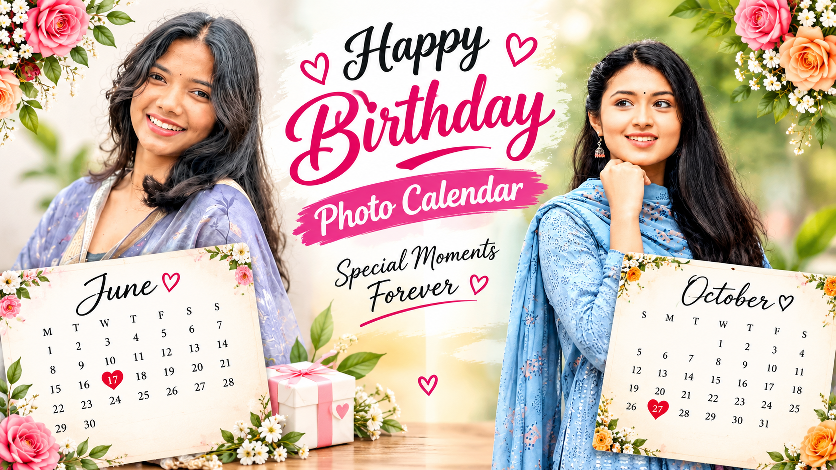
Happy Birthday Photo Editing Prompt – Beautiful Birthday Photo Editing
A birthday is a special day of the year.everyone loves to save those memories in a beautiful and creative way. A Happy Birthday Photo Calendar is a unique photo-editing idea that combines your favorite photo with a stylish birthday design, calendar, flowers, and beautiful birthday typography. If you are looking for a good photo prompt for a birthday, then this is a good one. You can use your own photo and create a premium-looking birthday poster that can be shared on Instagram, Facebook, WhatsApp, or other social media platforms.
In this post, you will learn how to create a beautiful birthday photo.
What Is a Happy Birthday Photo Calendar?
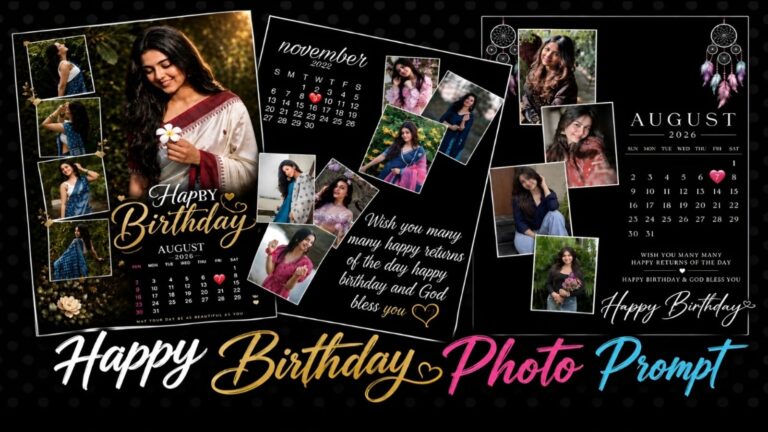
The ‘Happy Birth’ photo calendar is an attractive birthday post that combines a person’s photograph with a monthly calendar design. The birthday date can be highlighted with a heart or another attractive element, making the poster more personal and memorable.
The design can include:
- Your favorite birthday photo
- Happy Birthday text
- Monthly calendar
- Highlighted birthday date
- Beautiful flowers
- Premium typography
- Birthday wishes
- Photo-editing effects
You can easily create a birthday photo based on your preferences.
Why Is a Birthday Photo Calendar Popular?
Traditional birthday photos are beautiful, but a photo calendar gives your picture a more creative and personalized appearance. Instead of simply adding “Happy Birthday” to a photo, you can create a complete birthday-themed poster.The calendar makes the design especially interesting because you can highlight the exact birthday date. For example, if someone’s birthday is on the 27th, you can place a heart around 27 in the calendar.
How to Create a Birthday Photo Calendar
You can create a simple birthday photo using modern AI.You can start with a clear portrait photo of the person whose birthday you want to celebrate.
Step 1: Select Your Photo
Choose a good photo where your face looks clear, as this makes it easier for the AI tool.
For the best result, use a photo with:
- Good lighting
- Clear face
- High resolution
- Minimal blur
- Natural skin tone
- Clearly visible hairstyle
The better the original photo, the better the final birthday design can look.
Step 2: Upload Your Photo
Upload your selected photo to an AI image-generation or photo-editing tool. If you are using a birthday photo-editing prompt, add the photo as the identity reference.You should mention that the person’s facial identity should remain unchanged. This is important when creating an AI-generated birthday poster.
Step 3: Add the Birthday Calendar Design
For example:
Month: October
Birthday Date: 8
The birthday date can be highlighted with a heart, circle, flower, or another attractive decoration.
Step 4: Add Birthday Decorations
To make the poster more attractive, you can add flowers, leaves, hearts, gift boxes, soft lighting, and elegant decorative elements.
A white or ivory background can give the design a clean and premium appearance. Pink, red, green, and pastel colors can also be used to create a beautiful birthday atmosphere.
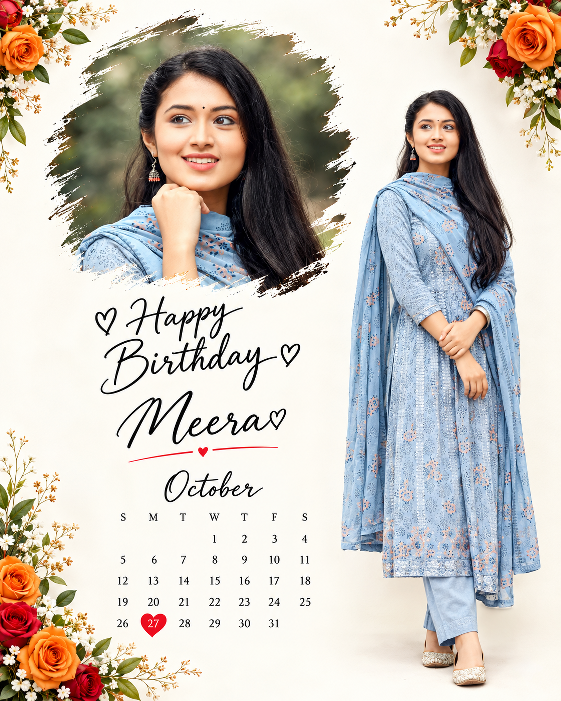
Copy Prompt ⤵️
Create a premium, elegant and ultra-realistic birthday photo-calendar poster inspired EXACTLY by the uploaded reference image.
FORMAT:
- Vertical 4:5 Instagram poster
- High-resolution, ultra-sharp, photorealistic quality
- Clean luxury birthday photography design
- Bright white / soft ivory background
- Elegant floral decoration around the corners
- Premium editorial composition with realistic shadows
PHOTO & IDENTITY RULES:
- Use the uploaded photo(s) as the ONLY identity reference.
- Preserve the person’s exact facial identity.
- Keep the exact face shape, eyes, eyebrows, nose, lips, jawline, skin tone, hairstyle and natural facial details.
- Do NOT beautify, reshape, retouch, face-swap or alter the person’s identity.
- Keep natural skin texture and realistic proportions.
- Do not generate any unrelated person.
- If multiple photos are uploaded, use each photo exactly ONCE.
- Do not duplicate, mirror, merge or replace any uploaded photo.
LAYOUT:
- TOP CENTER:
Place a large portrait of the birthday person inside an artistic irregular
black-and-brown paint-brush stroke frame.
The portrait should have a soft natural outdoor background and premium
DSLR photography quality.
- RIGHT SIDE:
Place a second full-body portrait of the same person.
Show the person standing naturally with a stylish casual outfit,
realistic proportions, natural pose and soft studio shadow.
Keep the complete body visible from head to shoes.
- LEFT / LOWER CENTER:
Add elegant handwritten-style birthday typography: “♡ Happy
Birthday ♡”
- BELOW THE MAIN GREETING:
Add the birthday person’s name in a large elegant handwritten script: “JANAKI♡” Add a thin red underline and a small red heart.
- BELOW THE NAME:
Add the month in elegant handwritten typography: “June”
- CALENDAR:
Add a clean minimalist monthly calendar below the month.
Use elegant black typography.
Highlight the birthday date with a bright red heart-shaped marker.
- FLOWER DECORATION:
Add realistic orange roses, red roses, small white flowers,
green leaves and delicate floral branches:
- top-left corner
- top-right corner
- bottom-left corner
Keep the flowers elegant and balanced.
Do not cover the portraits or text.
DESIGN STYLE:
- Premium Indian birthday poster
- Luxury floral editorial aesthetic
- Elegant handwritten typography
- White minimalist background
- Soft realistic shadows
- Natural skin texture
- High-end professional photography
- Balanced spacing
- Clean composition
- Instagram-ready
- Photorealistic
- 4K / 8K detail
- DSLR quality
- No artificial AI look
TEXT ACCURACY:
- Make all typography clean, readable and correctly spelled.
- Birthday person’s name and birthday date must be editable.
- Calendar must correctly match the selected month and year.
- Highlight ONLY the actual birthday date with a red heart.
NEGATIVE PROMPT:
No face distortion, no identity change, no face swap, no duplicate person,
no extra people, no extra limbs, no extra fingers, no deformed hands,
no unrealistic body proportions, no plastic skin, no excessive beauty filter,
no cartoon, no anime, no CGI, no artificial face, no blurry face,
no low resolution, no watermark, no random text, no misspelled words,
no duplicated photos, no merged faces, no unwanted objects.
Premium Birthday Calendar Design Ideas
There are many ways to customize your birthday calendar.
1.Floral Birthday Calendar
Add beautiful roses, small white flowers, green leaves, and floral borders around the calendar. This style looks elegant and romantic.
2.Luxury Birthday Calendar
Use a clean white or cream background with premium typography, subtle shadows, golden elements, and professional portrait lighting.
3.Romantic Birthday Calendar
Add pink hearts, roses, soft bokeh, pastel colors, and romantic birthday text.
4.Minimal Birthday Calendar
If you prefer a simple design, use a clean background, one large portrait, a small calendar, and elegant “Happy Birthday” typography.
5.Instagram Birthday Poster
For social media, you can create a vertical design suitable for Instagram posts or Stories. A 4:5 design is useful for Instagram feed posts, while a 9:16 design works well for Stories and Reels.
Tips for Getting the Best Result
For a professional-looking birthday calendar, keep the design balanced. Avoid adding too many elements because excessive decorations can make the poster look crowded.Use a high-quality portrait and make sure the face is clearly visible. Choose a calendar month that matches the person’s actual birthday month and highlight the correct date.Typography is also important. Use attractive handwritten or elegant script fonts for “Happy Birthday,” while keeping the calendar numbers simple and easy to read.
The background should complement the person’s clothing and the overall color scheme. Soft white, cream, pink, pastel, and natural green backgrounds can work especially well for floral birthday designs.
Create Your Own Happy Birthday Photo Calendar
A Happy Birthday Photo Calendar is an excellent way to turn an ordinary portrait into a beautiful birthday memory. With the help of AI photo-editing tools, you can create a professional-looking birthday poster without needing advanced graphic-design skills.Simply choose your favorite photo, upload it to an AI photo-editing tool, provide a detailed birthday calendar prompt, select the birthday month and date, and generate your design.You can then download the finished image and share it with your friends and family on social media.
Final Words
A birthday is a special occasion, and a personalized photo calendar can make that occasion even more memorable. Whether you want a floral birthday design, luxury birthday poster, romantic photo edit, or simple calendar-style greeting, you can customize the design according to your own style.The most important thing is to use a clear photo and provide proper instructions for preserving the person’s original identity. With the right photo and prompt, you can create a stunning Happy Birthday Photo Calendar that looks creative, elegant, and perfect for sharing online.